Skip to the main content
Steps on Screen
  • Home
  • Courses
  • Resources
  • Practice on a pretend computer in this browser tab. Its files and settings are pretend, and it starts fresh each time you open it.

    • Windows 11 simulator Opens a pretend Windows desktop.
    • macOS simulator Opens a pretend Mac sign-in screen. No password is needed: click the box that says Enter Password, leave it empty, then press the key labeled Enter or return.

    To come back here, click Back to Steps on Screen, above the pretend screen.

  • Scam Hub

Articles

  • Browser permissions
  • Clear the cache on a computer
  • Clear the cache on a phone
  • Saved passwords on a new Windows computer
  • Programs on a new Windows computer
  • Apps on a Chromebook
  • Saved passwords on a new Chromebook
  • They can't hear me on my video call
  • A page asks you to paste a command

More resources

  • Test your camera and microphone
  • Check a suspicious message or call
  • Printables
  • Computer wordsYou are here
  • Scam Hub
  • All resources
Browse articles

Articles

  • Browser permissions
  • Clear the cache on a computer
  • Clear the cache on a phone
  • Saved passwords on a new Windows computer
  • Programs on a new Windows computer
  • Apps on a Chromebook
  • Saved passwords on a new Chromebook
  • They can't hear me on my video call
  • A page asks you to paste a command

More resources

  • Test your camera and microphone
  • Check a suspicious message or call
  • Printables
  • Computer wordsYou are here
  • Scam Hub
  • All resources
  1. Home
  2. Resources
  3. Computer words

Computer word

What Is a Wi-Fi Signal?

A Wi-Fi signal is the wireless connection between your computer or phone and nearby Wi-Fi equipment. The Wi-Fi symbol shows the strength of that signal.

What it looks like
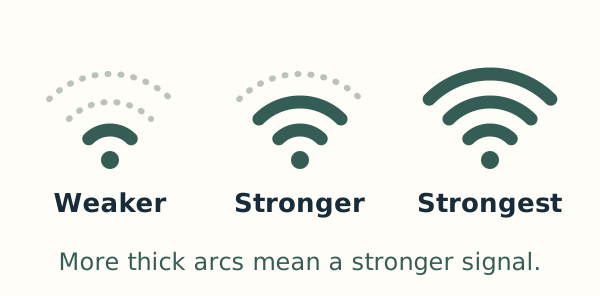
Three Wi-Fi symbols have one, two and three thick arcs, with faint dotted arcs for the unused ones. Their labels read Weaker, Stronger and Strongest.

More filled arcs or bars mean a stronger signal. The picture shows signal strength, rather than whether a website can open.

Lessons that use this word

  • How to Connect to Wi-Fi on Windows 11
  • How to Connect to Wi-Fi on a Mac

See every computer word

Free to use. No account needed.

The lessons stay free. To support this project with an optional tip, open Buy me a coffee, a separate website.

Request a lesson · All lessons · Computer words · About Steps on Screen · Contact Steps on Screen

To improve the lessons, we keep records of page visits, searches and practice sessions for up to one year.

Steps on Screen is an independent educational project. It is not affiliated with, endorsed by, or sponsored by Microsoft, Apple or Google. Windows, Mac, iPhone, Android and Chromebook are trademarks of their respective owners.